
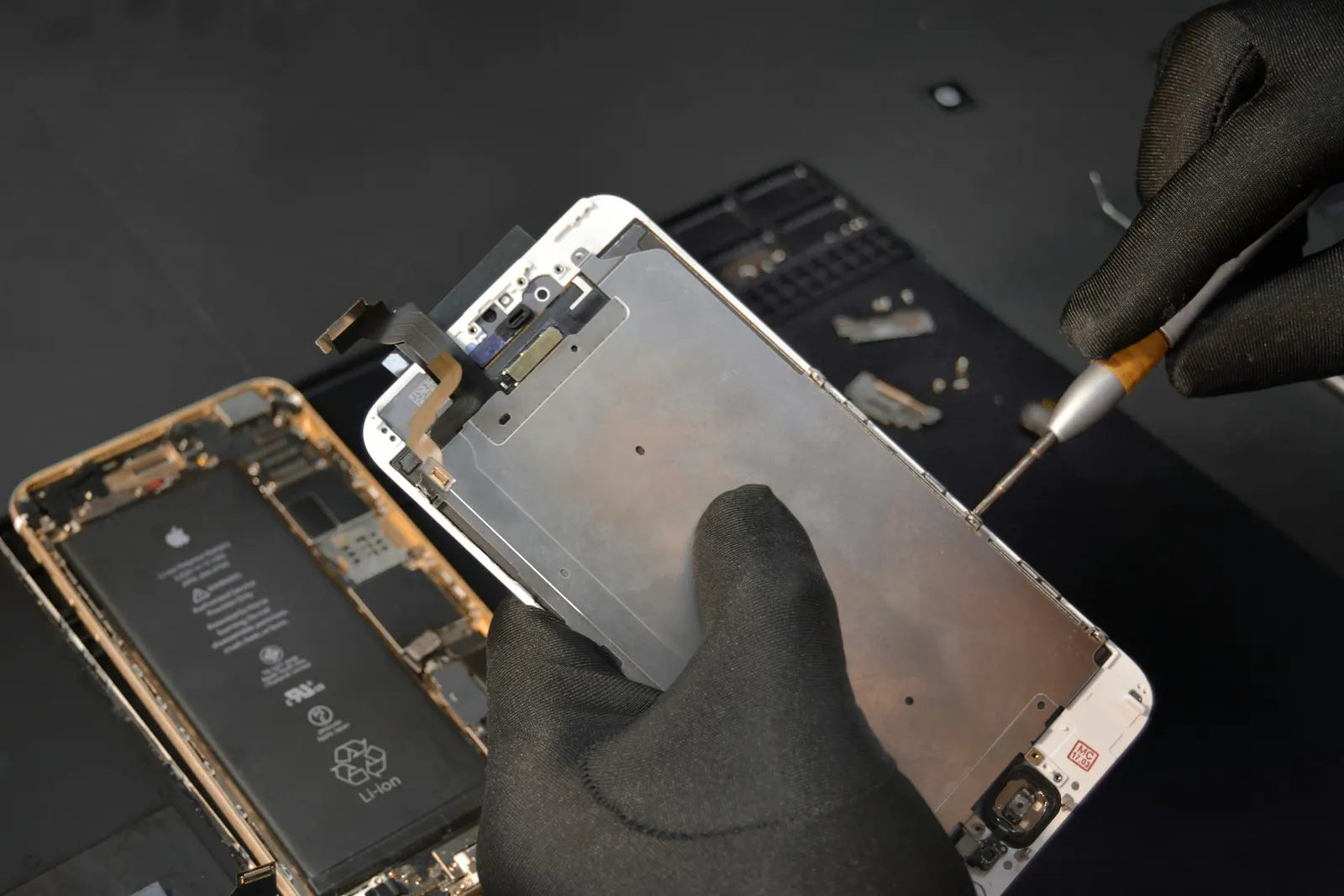
Display combo meaning, in simple words: a display combo (also called a "folder" or "combo set") is the full screen unit of a phone, with the display panel and the touch layer (digitizer) joined together as one part, and sometimes fitted in a new frame. When a shop says your phone needs a combo, it means the whole front screen assembly will be replaced, not just the top glass or the touch layer. On almost every modern smartphone the glass, touch and display are bonded together at the factory, so the combo is the standard screen replacement part.
What Is a Display Combo in Mobile Phones?
A phone screen is not one piece. It is a stack of layers that sit on top of each other:
- Cover glass: the outer glass you touch and the part that cracks first.
- Touch layer (digitizer): senses where your finger is. On many phones it is built into the display itself.
- Display panel: the LCD or AMOLED/OLED layer that makes the picture.
- Flex cable: the thin ribbon that connects the screen to the motherboard.
- Frame (on some combos): the metal or plastic middle frame the screen is glued into.
In older phones these layers were often separate, so a shop could change only the glass or only the touch. In most phones sold today the layers are laminated together with optical glue and no air gap. That makes the picture clearer and the phone thinner, but it also means the layers cannot be separated easily. So the repair part is the combo: glass, touch and display in one unit. Shop staff in India often call this the "folder"; the word "combo" simply means the display and touch come together.
Combo vs Folder vs Touch vs Glass-Only
Searchers often ask about combo vs folder vs touch. Here is how the words are usually used at repair counters. Different shops use them a little differently, so always ask what exactly is included.
| Term | What it usually means | When it is used |
|---|---|---|
| Display combo / folder | Display panel and touch layer joined as one unit, with cover glass | Cracked screen with lines, black patches, bleeding colour or no picture |
| Combo with frame | The same unit already glued into a new middle frame | When the old frame is bent, or the screen cannot be removed from the frame without damage |
| Touch only (digitizer) | Only the touch layer | Older or basic phones where the touch is a separate part |
| Glass only (glass change) | Only the outer glass is replaced, the original display is kept | Glass cracked but display and touch work perfectly |
A glass-only repair keeps your original display. It needs special machines to separate the cracked glass, and it carries a risk of damaging the panel during the process. A touch-only repair is only possible on phones where the touch is a separate layer, which is now rare. If you are unsure whether you even need a repair, read cracked screen still working: should you repair it.
LCD Combo vs AMOLED/OLED Combo
The type of display in your phone decides which combos are available.
- LCD (IPS/TFT) combo: used in many budget phones. The panel has a backlight behind it. LCD combos are simpler and widely available.
- AMOLED/OLED combo: used in most mid-range and flagship phones, including many Samsung, OnePlus, Vivo, Oppo and Realme models and iPhones from the iPhone X onwards. Each pixel makes its own light, so blacks are deep and the panel is thin.
Here is the important part. For many AMOLED phones, the cheaper replacement combos on the market are not AMOLED at all. They are LCD-type panels (often sold as "incell" or "TFT") made to fit the AMOLED phone. They show a picture and touch works, but colours, brightness, thickness and battery use can be different. Phones with an optical in-display fingerprint sensor need light to pass through the display, which an LCD-type copy panel generally cannot do, so in-display fingerprint usually stops working with these panels. Our guide on AMOLED vs LCD screen replacement explains the trade-offs, and fingerprint not working after screen replacement covers the fingerprint side in detail.
Quality Grades: Original, Service Pack and Copy
You will hear several names for combo quality. These are trade terms, not official standards, so the same word can mean slightly different things in different shops.
- Original / service pack: a panel made for the brand, often supplied in the brand's service packaging, sometimes with the frame. It should match the factory screen in colour, brightness and features such as in-display fingerprint and always-on display.
- OEM or high-grade compatible: made by a third party to be close to the original. Quality varies a lot between suppliers.
- Copy / duplicate (incell, TFT, "first copy"): the lowest-cost option. It may work fine for basic use, but often has lower brightness, different colours, weaker touch, a thicker build or missing features.
An honest shop tells you which grade it is fitting before the work starts and does not call a copy "original". Our full guide on original vs duplicate mobile screens explains how to tell them apart. Combo price depends on the model, the display type and the grade, so we do not quote fixed figures here; see mobile screen replacement cost in Kota for what changes the price, and our spare parts page for the display combos we stock.
How to Check You Have the Right Combo for Your Model
A combo that looks the same can still be wrong. Many phones are sold in several variants with small differences in the connector, the frame or the fingerprint position. Follow these steps before buying or fitting a combo.
- Find the exact model number. On Android, open Settings, then About phone. Note the model number (for example a code like SM-xxxx or a letter-number code), not only the marketing name.
- Check the variant. Some models have 4G and 5G versions, or different versions for different countries. The screen can differ even when the name is the same.
- Match the display type. Confirm whether your phone came with LCD or AMOLED, and whether the screen is flat or curved.
- Check the fingerprint position. In-display, side-mounted (power button) or rear. This tells you whether the combo must support an in-display sensor.
- Compare the flex cable and connector. A trained technician compares the new part with the old one before removing any glue.
- Test before final sealing. A good shop connects the new combo, checks picture, touch in all corners, brightness, fingerprint and sensors, and only then glues the phone shut.
What Is Transferred During Fitting
A combo does not always include everything that sits around the screen. Depending on the phone and whether the combo comes with a frame, some parts are moved from the old screen or frame to the new one. Common examples:
- Earpiece speaker mesh and dust filters.
- Side button flex, volume keys or the power button (when a frame is included).
- On iPhones from the X onwards, the earpiece and front sensor flex are usually moved to the new screen. Care here matters for Face ID; see iPhone Face ID not working.
- On iPhones with a Home button, the original Home button has to be moved, because Touch ID is tied to the phone.
- New adhesive and, if needed, a new seal around the screen.
On a frame-included combo, the technician moves the motherboard, battery and other parts into the new frame instead. This takes longer but often gives a cleaner fit when the old frame is bent. Ask the shop which method they are using.
Common Problems After a Combo Is Fitted
- Touch not working or ghost touch: usually a loose connector or a low-grade panel. See touch not working after screen replacement.
- Fingerprint not working: often a copy panel or the sensor needing recalibration.
- Screen lifting at the edge: poor adhesive or a swollen battery pushing the screen.
- Brightness or colour different: a different panel grade from the factory one.
Our screen replacement warranty and care guide explains what to check in the first few days after a new screen.
Combo or Brand Service Centre?
If your phone is still under the brand's warranty, authorised brand service centres exist and should be your first stop for in-warranty repairs. You can find them through the brand's official support website. Brands such as Samsung India's spare part cost page also publish their own part prices. For how authorised prices compare with independent shops, read our guide on original display price in service center.
How Our Keshavpura Shop Handles Display Combos
At our Keshavpura shop in Kota we start with a free check-up to confirm whether you need a full combo, a combo with frame, or whether the display is fine. We tell you which grade of combo is available for your exact model, and the exact price is confirmed before any work begins. The phone is opened in front of you. Every screen replacement comes with our warranty on the part and labour; the period depends on the part. Doorstep pickup is available in Kota. You can see brand pages such as Samsung repair and Vivo repair, or contact us to book a check-up.
Frequently asked questions
Is a display combo the same as a folder?
Yes, in most Indian repair shops the two words mean the same part: the display panel and touch layer joined as one unit. Some shops use folder for a combo that comes with a frame, so ask what is included.
Can only the touch or glass be changed instead of the full combo?
On most modern phones the glass, touch and display are bonded together, so the full combo is the normal repair. Glass-only repair is possible on some models with special equipment, but it carries a risk of damaging the display underneath.
What does combo with frame mean?
It is a display combo that already comes glued into a new middle frame. It is useful when the old frame is bent or the screen cannot be removed cleanly, and the phone's internal parts are moved into the new frame.
Why does a copy combo cost less than an original one?
Copy combos often use a cheaper panel type, such as an LCD-type panel in place of AMOLED, and may lack features like in-display fingerprint. The lower price reflects lower brightness, colour accuracy or touch quality.
How do I know which combo fits my phone?
Check the exact model number in Settings, then About phone, and note the variant, display type and fingerprint position. A technician should compare the new part with the old one before fitting it.
Questions & comments
Ask our Kota technicians anything about this repair. All posts are reviewed before they appear. For an urgent quote, WhatsApp us.
No comments yet, be the first to ask a question.
Leave a comment or ask a question
First, verify your email. We send a 6-digit code so we know you are a real person. Your email is never shown publicly.
Enter the 6-digit code we emailed to .